Email Bounce Handling: Hard vs Soft Bounces and What to Do With Them
A practical guide to SMTP bounces, temporary deferrals, permanent failures, suppression lists and safe list hygiene.
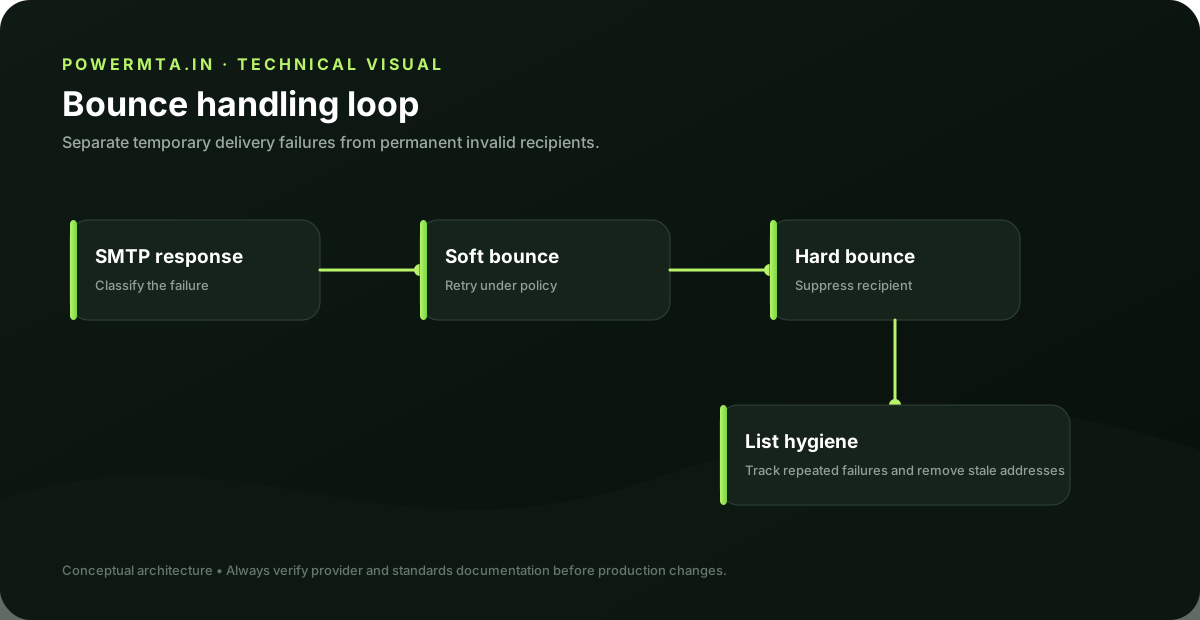
A bounce is a delivery outcome, not just an error
A bounce tells you that a message could not be delivered as attempted. The important distinction is whether the failure is permanent or temporary and whether the response gives enough information to determine the next action.
Hard vs soft bounces
A permanent failure generally means the address or destination is not currently deliverable and should be suppressed after appropriate verification. A temporary failure may be caused by rate limiting, a full mailbox, transient DNS or remote-server conditions. Temporary failures should be retried according to a controlled policy rather than treated as permanent immediately.
Read the SMTP response
The numeric SMTP status and enhanced status code can provide useful clues. Do not build your entire suppression logic around one keyword. Capture the response, the receiving domain, the retry history and the final disposition so you can distinguish transient infrastructure problems from persistent address problems.
Suppression is part of list hygiene
Once an address has a confirmed permanent failure, continuing to send repeatedly creates unnecessary load and can worsen list quality. Maintain a suppression list so the address is not accidentally re-imported by another campaign or application.
Retries need boundaries
- Retry temporary failures with increasing delays rather than hammering the remote server.
- Stop retrying when the failure becomes clearly permanent.
- Keep the final SMTP response for troubleshooting.
- Separate address-level suppression from domain-level incidents.
- Investigate spikes in bounces before assuming the list suddenly became bad.
When a whole domain starts bouncing
A sudden increase in failures from one recipient domain can indicate a reputation issue, DNS problem, authentication problem or policy block rather than bad individual addresses. Look at the pattern across the campaign, IP, domain and SMTP response before suppressing large portions of the list.
Operational checklist
- Store the final bounce reason.
- Suppress confirmed permanent failures.
- Retry temporary failures conservatively.
- Monitor bounce rates by domain and campaign.
- Investigate sudden spikes before changing list strategy.
- Keep suppression synchronized across sending systems.
Build a suppression model
A mature sender separates at least three outcomes: permanent address failures, temporary delivery failures and policy/reputation failures. The first category often leads to suppression. The second leads to controlled retry. The third requires an operational investigation rather than repeated delivery attempts.
Do not confuse a deferral with a bad address
A 4xx response generally indicates that the receiver is asking the sender to try again later. The correct response is usually controlled retry according to the sender's queue policy. Treating every 4xx response as a permanent bounce can suppress good recipients and hide an infrastructure problem.
Domain-level bounce spikes
Group bounce events by recipient domain, SMTP response and sending IP. If one domain suddenly produces a large spike while other domains remain normal, investigate that receiver's policy response before changing the entire list. If many domains spike simultaneously, inspect your own authentication, infrastructure and list quality.
Keeping suppression synchronized
If several applications send mail for the same organization, a suppression list should be shared or synchronized. Otherwise one system can continue sending to addresses that another system has already determined should be suppressed. This is an operational data problem, not merely an email-copy problem.
Example decision tree
If the receiver returns a permanent mailbox failure, record the address and suppress it according to your policy. If the receiver returns a temporary failure, queue a retry and monitor the subsequent result. If the response indicates a policy or reputation issue, stop treating it as an individual address problem and investigate the sending system, authentication, content or receiver relationship.
Keep the original response
Store the SMTP response and timestamp associated with the final delivery attempt. A normalized label such as “hard bounce” is useful for reporting, but it should not replace the original response. The raw reason is often what an operator needs when investigating a sudden delivery problem.
Review bounce trends
Look at bounce behavior by campaign, sender, IP, recipient domain and time. A stable baseline is more useful than a single percentage. Spikes can reveal stale lists, a broken import, a DNS outage, a provider migration or a receiver policy change.
Troubleshooting worksheet
When bounce rates change, export the original SMTP response, status code, recipient domain, sending IP and campaign identifier. Group the events before suppressing addresses in bulk. This lets you distinguish a bad list from a receiver policy event or a sending-infrastructure problem. Keep the raw response even after assigning your internal bounce category.
Implementation checklist
- Store original SMTP responses.
- Classify permanent, temporary and policy failures separately.
- Suppress confirmed permanent failures.
- Retry temporary failures conservatively.
- Investigate receiver-wide spikes before changing the list.
- Synchronize suppression across all sending systems.
The objective of bounce handling is not to make a dashboard percentage look better. It is to protect recipient experience, reduce unnecessary delivery attempts and give operators enough evidence to diagnose genuine infrastructure or policy problems.
Protect the data trail
Bounce handling should preserve enough history to answer three questions later: what was sent, what the receiver returned, and what action the sender took. That history is valuable when investigating complaints, migrations or sudden delivery changes. A suppression list without the original evidence is much harder to audit.
Sources & further reading
This guide is independently written. The references below are used to verify standards, platform requirements, or product-specific behavior where applicable.