Email Marketing
Email Deliverability Checklist — Complete Inbox Placement Guide for Indian Senders
What this guide covers
- Authentication and domain alignment
- List quality, consent and unsubscribe handling
- Reputation and complaint monitoring
- Infrastructure and message-level checks
Getting an email delivered to an inbox is not the same as getting it opened — but if a message does not reach a recipient's inbox, downstream engagement becomes much harder to achieve. Every year, a significant share of legitimate marketing and transactional email from Indian senders lands in spam simply because of avoidable technical and reputation mistakes. This checklist walks through everything that actually affects inbox placement, in the order it matters.
If you have already set up DKIM, SPF and DMARC using our free generators, you have handled the authentication basics. This guide goes further — into sending reputation, list hygiene, content triggers and the ongoing habits that keep your domain trusted by Gmail, Outlook and other major providers.
1. Authentication Is the Floor, Not the Ceiling
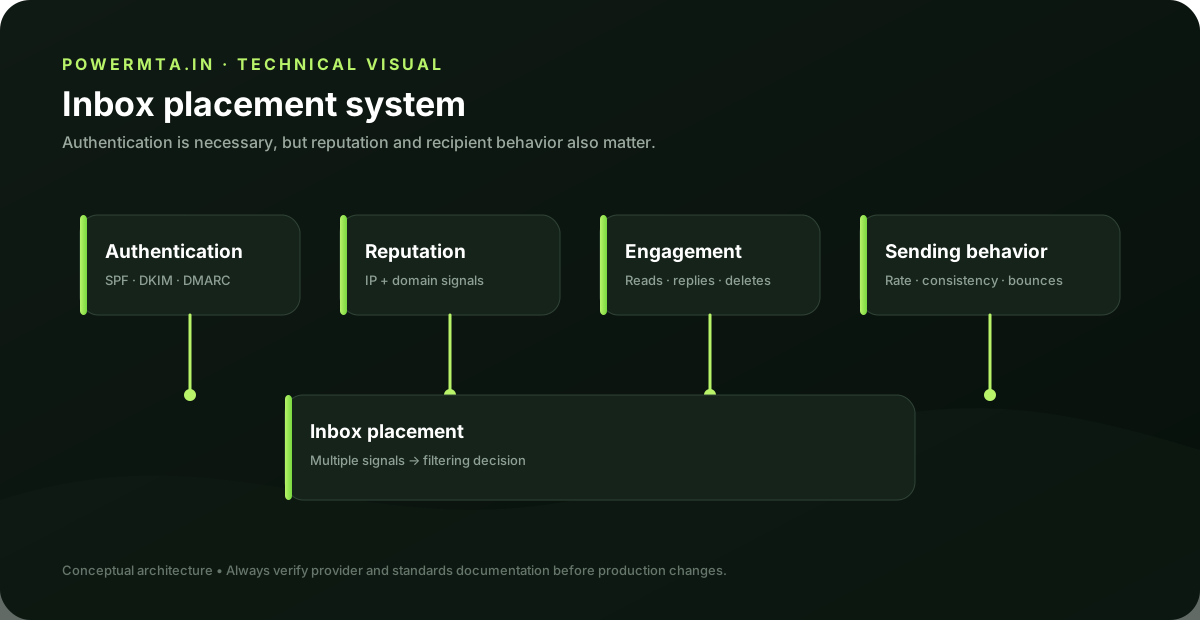
SPF, DKIM and DMARC prove that an email claiming to be from your domain is genuinely from you. Without them, most modern mail providers either reject your mail outright or route it straight to spam — Gmail and Yahoo made this mandatory for anyone sending meaningful volume starting in 2024. But having all three configured correctly only gets you a seat at the table. It does not guarantee inbox placement on its own.
Authentication Checklist
2. Sender Reputation Is Everything Else
Once authentication is in place, inbox providers score every message based on your domain and IP reputation — built from how recipients have historically treated your mail. This reputation is the single biggest factor in whether a properly authenticated email still lands in spam.
Warm Up New Sending Domains and IPs
If you are sending from a brand-new domain or a fresh IP, do not blast your full list on day one. Start with your most engaged subscribers — people who have opened or clicked recently — and gradually increase volume over 2-3 weeks. Mail providers watch for sudden spikes in volume from unproven senders as a spam signal.
Watch Your Engagement Metrics
Open rates, click rates, and — critically — how often people mark your mail as spam or delete it without opening, all feed directly into your sender score. A list full of disengaged subscribers drags down deliverability for your entire domain, even for the subscribers who do want your mail.
3. Clean Your List on a Schedule
Every list decays. Email addresses go stale, people change jobs, spam traps get seeded into old purchased or scraped lists. Indian senders working with lists built up over a few years should be especially careful here.
- Remove hard bounces immediately — never retry them
- Suppress subscribers who have not opened anything in 90-180 days, or move them to a re-engagement campaign
- Never buy or scrape email lists — purchased lists are a high-risk way to increase the chance of spam complaints, poor engagement and list-quality problems
- Use double opt-in where possible, especially for high-value transactional relationships
4. Content and Formatting Signals
Spam filters still look at content, even with modern machine-learning-based filtering. A few patterns reliably increase spam risk regardless of your authentication and reputation:
- All-caps subject lines or excessive exclamation marks ("FREE!!! LIMITED TIME!!!")
- A poor text-to-image ratio — an email that is almost entirely one large image
- Broken or misleading unsubscribe links, or no unsubscribe link at all
- URL shorteners in the email body, which spam filters often flag
- A big mismatch between your "From" name and your actual sending domain
5. Monitor With Google Postmaster Tools
If a meaningful share of your list uses Gmail — which is true for most Indian audiences — set up Google Postmaster Tools for your sending domain. It is free and shows you your domain reputation, spam rate, and authentication success rate directly from Gmail's perspective, which is the closest you will get to ground truth on your deliverability.
6. Send Consistently
Sporadic sending — quiet for two months, then a sudden burst of five campaigns in a week — looks suspicious to inbox providers. A steady, predictable sending cadence, even if it is just once a week, builds a more stable reputation than irregular bursts.
Frequently Asked Questions
Authentication (SPF, DKIM, DMARC) only proves you are who you say you are. Inbox placement is decided separately by sender reputation, engagement history and content signals, which build up over time and can override correct authentication.
Review and clean your list at least every 90 days — remove hard bounces immediately, and suppress or re-engage subscribers who have not opened anything in the last 90 to 180 days.
Healthy engaged lists in India typically see 20-35% open rates depending on industry. If yours is consistently under 15%, focus on list cleaning and re-engagement before sending more volume.
Quick Summary
- Authentication (SPF, DKIM, DMARC) is required but not sufficient on its own
- Sender reputation, built from engagement history, is the biggest deliverability factor
- Warm up new domains and IPs gradually instead of sending full volume immediately
- Clean your list every 90 days and never buy or scrape email addresses
- Avoid spam-trigger content patterns like all-caps subjects and broken unsubscribe links
- Use Google Postmaster Tools to monitor your domain reputation directly
- Send on a consistent, predictable schedule rather than irregular bursts
Sources & references
Primary and authoritative references used when preparing or reviewing this article. Product features, policies and standards can change, so verify current requirements before making production changes.
Runs PowerMTA.in alongside his own email marketing and affiliate operations targeting Indian audiences — hands-on with bulk sending infrastructure, live campaigns, and content properties. Read more →