Hard Bounce vs Soft Bounce: What They Mean and How to Handle Them
What a bounce tells you
A bounce is an indication that a message could not be delivered as attempted. The failure can be permanent, such as a nonexistent recipient, or temporary, such as a full mailbox or a receiving server that is temporarily unavailable. The important operational distinction is not simply the words hard and soft. The actual SMTP response, enhanced status code and receiving-server explanation provide better evidence about what happened.
Hard bounces
A hard bounce generally indicates a condition that is unlikely to be resolved by retrying the same address, such as an invalid recipient. Continuing to send repeatedly to known invalid addresses wastes resources and can damage list quality. A responsible system records the failure and suppresses the recipient according to its list-management rules. Before suppressing permanently, distinguish an actual invalid recipient from a temporary provider or DNS issue.
Soft bounces
Soft bounces commonly describe temporary conditions. Examples include a mailbox that is temporarily full, a receiving server that is busy, or a transient network or policy response. A queue can retry these messages according to a controlled retry schedule. Retries should be bounded. Endless retries can create unnecessary traffic and make an already-degraded situation worse. The retry policy should consider response codes, elapsed time and the message's business importance.
Enhanced status codes
Enhanced status codes add detail to the SMTP response. The first digit broadly indicates success, temporary failure or permanent failure, while the following values provide more context. Do not build a suppression engine that relies only on one numeric code. Record the complete response, receiving host, timestamp and message identifier. Patterns across these fields are often more useful than a single code.
Bounce processing workflow
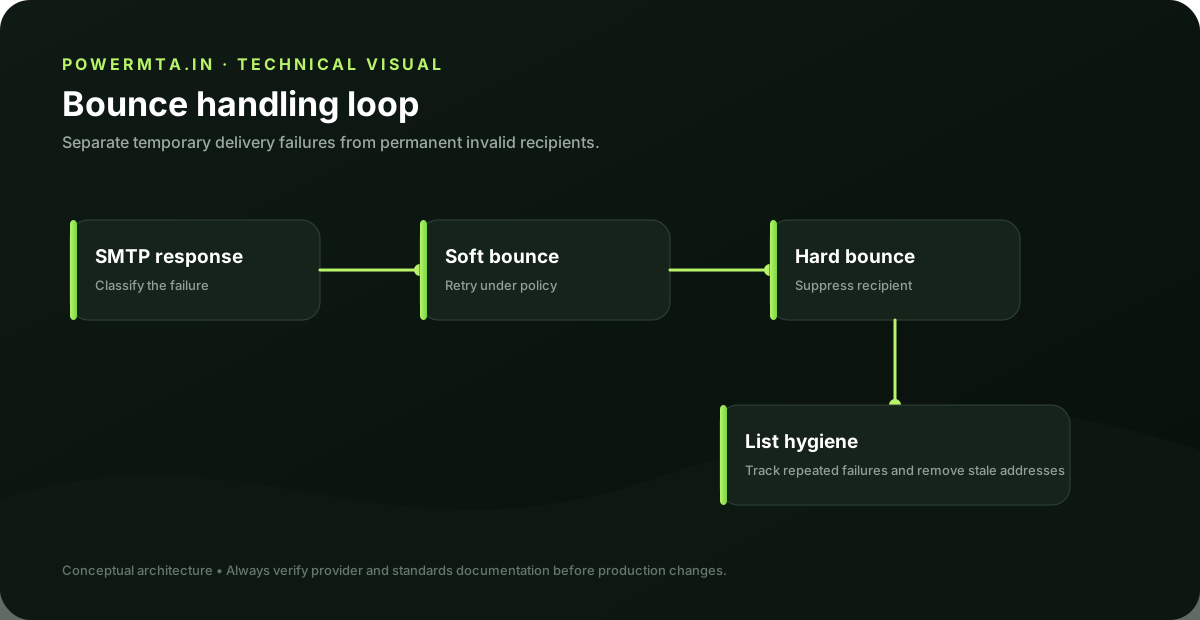
A useful workflow is: capture the delivery event, classify the response, apply retry or suppression logic, record the outcome, and make the result available to reporting. Marketing systems should also keep bounce handling connected to unsubscribe and complaint processing. The exact retry schedule should match the application's business requirements and the receiving system's behavior. A transactional password reset may require different handling from a low-priority newsletter.
Common mistakes
The most common mistake is treating every failure as permanent or every failure as retryable. Another is deleting bounce information instead of retaining enough history to identify recurring problems. Good bounce handling is a data-quality process as much as it is a queueing feature.
Practical checklist
- Record the exact hostname, domain, IP address or SMTP response involved in the issue.
- Change one variable at a time and keep a short change log.
- Verify the result with a real test message and inspect the relevant DNS or SMTP evidence.
- Document the final configuration so the next migration or incident starts with known-good information.
Frequently asked questions
Is there one setting that guarantees successful delivery?
No. Email delivery depends on the complete sending path, including infrastructure, authentication, recipient policy, message handling and operational practices.
Should I change several settings at once when troubleshooting?
Usually no. Controlled changes make it easier to identify the cause and confirm whether the fix actually worked.