DKIM Troubleshooting: Why Messages Fail Authentication and How to Fix Them
A practical DKIM troubleshooting guide covering selector records, DNS, signing, key rotation, alignment and message inspection.
What DKIM proves
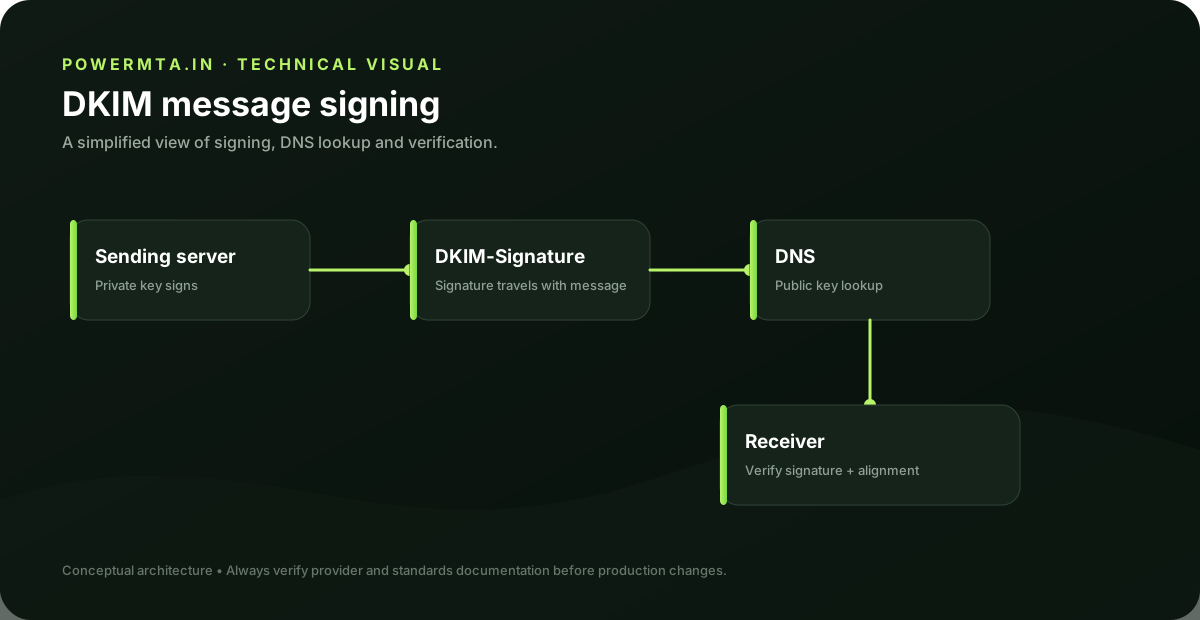
DKIM adds a cryptographic signature to an email. The receiving system retrieves the public key from DNS using the selector named in the DKIM-Signature header and verifies that the signed content and selected headers have not been altered in a way that invalidates the signature.
Start with the selector
The selector is the first thing to identify. A message may be signed with s=selector1, while the DNS record is published under selector1._domainkey.example.com. Looking up the wrong selector is one of the simplest reasons a perfectly valid key appears to be missing.
DNS problems
- The TXT record is published at the wrong hostname.
- The key is malformed by the DNS provider.
- A CNAME-based selector points to a target that no longer exists.
- A stale selector remains after a provider migration.
- The application is signing with a selector different from the one you published.
Inspect the message itself
Use the raw message source and find the DKIM-Signature header. Record the d= domain and s= selector. Then inspect the receiving system's Authentication-Results header. This gives you a concrete starting point instead of guessing from DNS alone.
Why DKIM can pass but DMARC still fail
DKIM authentication and DMARC alignment are separate checks. A message can have a valid DKIM signature from a service domain while the visible From domain is different. DMARC evaluates alignment between the authenticated identity and the visible From domain. Your sending platform therefore needs both a valid signature and an identity strategy that matches your domain requirements.
Key rotation
Rotate keys deliberately. Publish the new selector first, confirm it resolves correctly, then switch the signing system to the new selector. Keep the old selector available for a reasonable overlap period so messages already in transit can still be verified. Remove obsolete keys only after the old traffic has drained.
Production checklist
- Confirm the selector in the actual message.
- Verify the public key exists at selector._domainkey.domain.
- Confirm the sending system is signing every intended stream.
- Check Authentication-Results at the receiving mailbox.
- Check DMARC alignment separately.
- Document selector ownership and rotation dates.
A worked selector example
If a message contains d=example.com; s=mail2026, the receiving system will look for the public key associated with the mail2026 selector under the domain's DKIM namespace. If the DNS record exists under a different selector, the receiver cannot retrieve the expected key. Always copy the selector from a real message when troubleshooting.
When signatures break
A signature can fail if a signed header changes, the body is modified, the key cannot be retrieved, or the signing configuration is inconsistent. Forwarding systems, content gateways and security products can sometimes modify messages. When investigating, compare a message immediately after sending with the message received at the destination.
Safe key rotation
Treat key rotation as a controlled change. Publish the new key, verify DNS, switch the signer, observe authentication results, and only later remove the old selector. This creates an overlap period and reduces the risk of breaking mail during a provider migration.
DKIM operational checklist
- Document every active selector and its owner.
- Keep DNS records under change control.
- Verify the signer and DNS record after provider migrations.
- Monitor Authentication-Results at multiple recipient domains.
- Rotate obsolete keys rather than accumulating permanent selectors.
Provider migration example
Suppose a marketing platform changes from one provider to another. The visible From address may remain unchanged, but the DKIM selector and signing domain can change. The correct migration sequence is to obtain the new provider's signing configuration, publish the required DNS record, verify it, switch traffic, and then remove the old selector after the transition.
Reading Authentication-Results
When troubleshooting, do not rely only on the sending application's dashboard. A receiving mailbox can show whether DKIM passed, failed or could not be evaluated. Compare the DKIM result with the selector and signing domain in the actual message. This closes the gap between what the sender believes it configured and what the receiver actually observed.
A maintainable DKIM inventory
- Selector name.
- Signing domain.
- Sending platform or application.
- Date introduced.
- Last verified date.
- Rotation or retirement plan.
Troubleshooting worksheet
For every DKIM failure, record the selector, signing domain, receiving domain, Authentication-Results value and the exact message timestamp. Verify the selector in DNS, then compare it with the signer configuration. If the key exists but verification still fails, inspect whether the message was modified between the sending system and the mailbox. This structured approach is more reliable than regenerating keys repeatedly.
Implementation checklist
- Record every selector and signing domain.
- Publish the new selector before switching traffic during a migration.
- Verify the selector in DNS from outside the local network.
- Inspect real messages rather than relying only on application dashboards.
- Maintain an overlap period during key rotation.
- Retire obsolete selectors after the old traffic has drained.
DKIM becomes much easier to operate when selectors, owners and rotation dates are documented. The goal is predictable verification, not simply a green result from one test message.
Before you change the key
Do not regenerate a DKIM key simply because a checker reports failure. First identify the selector and signing domain in a real message, verify the DNS record, and confirm the receiving system can retrieve the public key. Key regeneration is a configuration change and should be the final step after the actual failure mode is understood.
Sources & further reading
This guide is independently written. The references below are used to verify standards, platform requirements, or product-specific behavior where applicable.