SMTP Relay vs SMTP Server: What’s the Difference and Which Do You Need?
A practical explanation of SMTP servers, relays, clients and submission services, with examples for websites, transactional email and marketing platforms.
Start with the mental model
SMTP is the protocol used to transfer email between mail systems. The confusing part is that the words SMTP server and SMTP relay are often used for overlapping pieces of the same system. A server can accept mail for delivery, relay mail onward, or both, depending on its role and configuration.
For a website owner, the useful question is not “Which one is better?” It is “Where is my application handing the message off, and which system is responsible for final delivery?” That distinction affects authentication, queues, bounce handling, logging and reputation.
SMTP client, submission server and relay
An application normally acts as an SMTP client. It connects to a submission endpoint, authenticates, and hands the message to an SMTP service. That service may then relay the message to the recipient’s MX server. In larger systems, there can be several hops between the application and the destination.
- SMTP client: your application, mail library or sending software.
- Submission service: accepts authenticated messages from your application or users.
- Relay: transfers accepted messages toward another mail server.
- Receiving server: accepts mail for the recipient domain and decides whether to deliver, defer or reject it.
When a relay is useful
A dedicated relay is useful when the application should not manage remote delivery itself. The relay can centralize queues, connection management, retries, authentication and operational monitoring. This is common with SaaS applications, ecommerce systems and organizations that have several applications sending mail.
A self-hosted MTA can also perform relay functions. In that model, the MTA becomes the organization’s controlled sending layer and can route different message streams through different delivery servers.
Direct delivery vs relaying through a provider
With direct delivery, your sending system looks up the recipient domain’s MX records and connects to the receiving infrastructure. With provider-based relaying, your system hands the message to the provider and the provider performs the remote delivery. Neither model is automatically more deliverable. Reputation, authentication, message quality, recipient engagement and operational discipline still matter.
What to configure before production
- Publish SPF for the domain(s) that actually authorize your sending infrastructure.
- Enable DKIM signing for every important sending stream.
- Publish a DMARC policy and monitor alignment before increasing enforcement.
- Use TLS and valid forward/reverse DNS for the sending infrastructure.
- Configure bounce and complaint handling before sending meaningful volume.
- Separate transactional and promotional traffic when their operational requirements differ.
A simple architecture
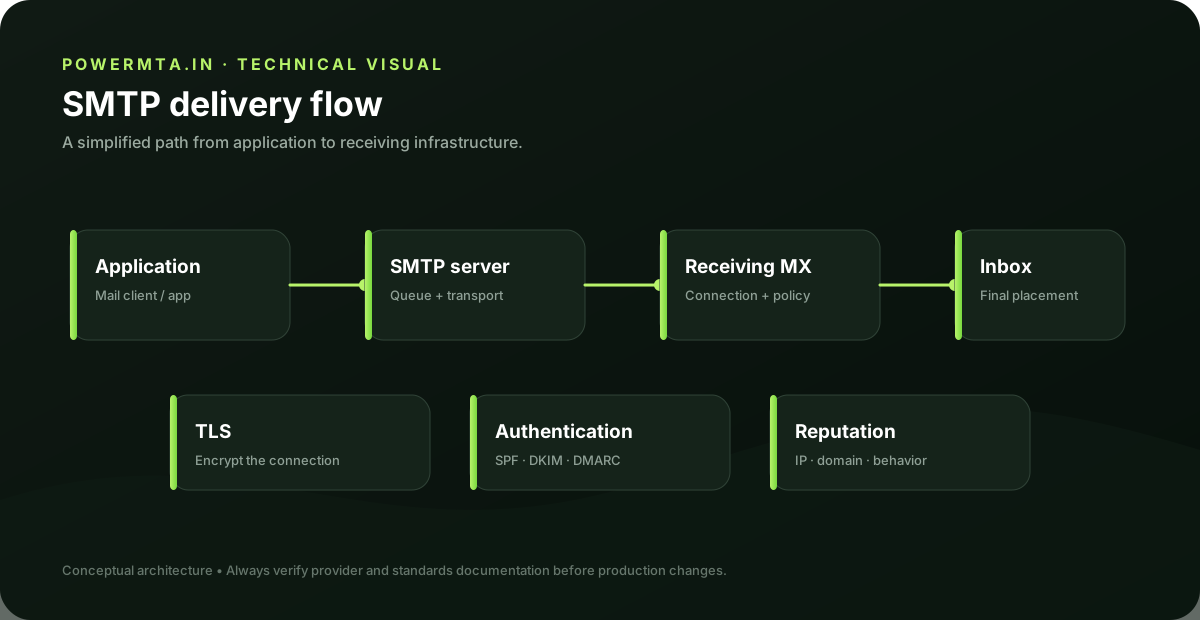
Website → SMTP submission/relay → sending MTA → recipient MX → inbox or spam folder. The key is to document each handoff. When a message fails, you should be able to identify which system accepted it, which system attempted delivery, and what response was returned.
Common mistakes
- Treating an SMTP relay as a guarantee of inbox placement.
- Using one unauthenticated domain identity across unrelated sending streams.
- Ignoring bounces because the relay reports the message as accepted.
- Changing the sending IP or domain without updating authentication and DNS.
- Assuming the SMTP status code alone explains the final inbox placement decision.
Practical checklist
- Can you name the SMTP client, submission endpoint and delivery MTA?
- Do SPF and DKIM authorize the actual sender?
- Does DMARC align with the visible From domain where required?
- Do you have logs for acceptance, deferral, bounce and delivery events?
- Can you pause one stream without stopping unrelated mail?
How to choose the right architecture
Choose a managed relay when you want the provider to handle remote delivery, reputation operations and much of the connection management. A self-hosted relay is more appropriate when you need direct operational control, custom routing, local queues or infrastructure-level visibility. The trade-off is that you also inherit responsibility for DNS, TLS, authentication, reputation, monitoring and incident response.
Example: transactional application
Suppose an ecommerce application sends password resets, receipts and order notifications. The application should hand messages to a controlled submission service rather than opening arbitrary outbound SMTP connections from every web worker. The submission layer can authenticate the application, apply rate limits and provide a central log. From there, the delivery layer can handle remote MX connections and retries.
Example: marketing platform
A marketing platform has different requirements because campaigns can create large bursts and generate complaints or bounces. The sending layer should therefore provide suppression, bounce processing, unsubscribe handling and campaign-level monitoring. Separating promotional traffic from transactional traffic can make incidents easier to contain and diagnose.
Troubleshooting a failed message
Start at the first handoff. If the application never successfully authenticated to the submission server, the problem is local to the application or credentials. If the submission server accepted the message but the delivery MTA later deferred it, inspect the remote SMTP response. If the recipient accepted the message but it is not visible in the inbox, SMTP transport succeeded and the investigation moves to filtering, reputation and mailbox-level behavior.
Operational design questions
Before choosing a delivery architecture, write down who owns each responsibility. Someone must own SMTP credentials, DNS, TLS certificates, queue behavior, retries, bounce processing, suppression, logging and incident response. A small team can still self-host, but the responsibilities do not disappear when the software is installed. They simply move to the operator.
Testing before production
Create a test domain or controlled sending stream where possible. Send to several mailbox providers, inspect the raw headers, confirm SPF/DKIM/DMARC results, and deliberately generate a test failure so you know where the bounce appears. Confirm that the application, relay and delivery layer each record enough information to trace a message end to end.
Decision summary
- Choose a relay when operational simplicity and centralized delivery are more important than owning every delivery detail.
- Choose a self-hosted MTA when you need control over queues, routing, infrastructure and operational data.
- In either model, treat authentication, DNS, TLS and bounce handling as first-class components.
- Document the complete message path before increasing sending volume.
Sources & further reading
This guide is independently written. The references below are used to verify standards, platform requirements, or product-specific behavior where applicable.